Using React Hooks to sync your component state and the URL query string
Use React state and the query string together: helpers with query-string, a small useQueryString hook, and a react-bootstrap Tabs example on CodeSandbox.
Originally published in The Startup on Medium (Sep 7, 2019).
Many times we want to control parts of our app by modifying the query string parameters. Learn how you can do it by using React hooks.
To illustrate that we’re going to use a simple Tabs component. The idea is: once the selected tab changes, the query string parameters are updated accordingly. In the same way, if you load your component with a valid query parameter in place, the component will initialize its state accordingly.

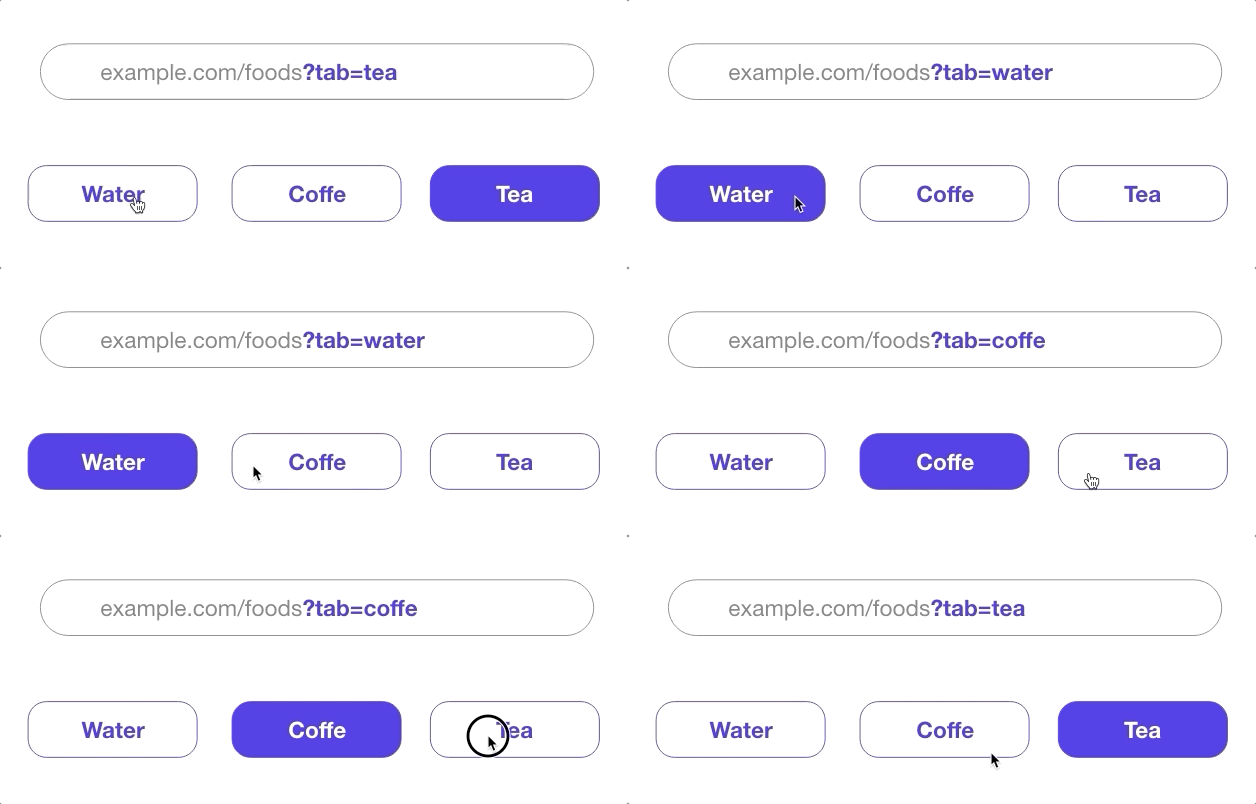
The query string modifies as the selected tab is modified.
Manipulating the Query string
First, we’re going to define a few handfull functions to manipulate the query string. We will use the library query-string to helps us achieve that.
- setQueryStringWithoutPageReload replaces the current query string value with the new provided value without triggering a page refresh.
- setQueryStringValue updates the query string parameters only for the provided key, keeping the remaining parameters intact.
- getQueryStringValue returns the query string value for the provided key.
import * as qs from "query-string";

const setQueryStringWithoutPageReload = (qsValue) => {
  const newurl =
    window.location.protocol +
    "//" +
    window.location.host +
    window.location.pathname +
    qsValue;

  window.history.pushState({ path: newurl }, "", newurl);
};

const setQueryStringValue = (
  key,
  value,
  queryString = window.location.search
) => {
  const values = qs.parse(queryString);
  const newQsValue = qs.stringify({ ...values, [key]: value });
  setQueryStringWithoutPageReload(`?${newQsValue}`);
};

export const getQueryStringValue = (
  key,
  queryString = window.location.search
) => {
  const values = qs.parse(queryString);
  return values[key];
};
Writing the hook
All we have to do now is to write our hook:
import { useState, useCallback } from "react";
import { getQueryStringValue, setQueryStringValue } from "./queryString";

function useQueryString(key, initialValue) {
  const [value, setValue] = useState(getQueryStringValue(key) || initialValue);
  const onSetValue = useCallback(
    newValue => {
      setValue(newValue);
      setQueryStringValue(key, newValue);
    },
    [key]
  );

  return [value, onSetValue];
}

export default useQueryString;
Breaking it down:
- First, we import the hooks
useStateanduseCallbackfrom React and the functionsgetQueryStringValueandsetQueryStringValuewe defined before from another file which I called “queryString.js”. - Our hook, named
useQueryString, receives two parameters:- key: the key used to identify our state value in the query string.
- intialValue: the initial value used if there isn’t a value for the provided key among the query string parameter yet.
- We initialize our state by checking if there is already a value for the given key in the query string. In case there isn’t, we just use the provided intialValue.
- We declare a callback function
onSetValuewrapped with theuseCallbackhook to avoid our function to be redefined in every re-render. Once it is called, this function will update the hook state and also the value of the query string with the providednewValue. - Finally, we return from the hook the
valueand theonSetValue. That’s all the consumer of this hook will need to keep its state in sync with the query string.
Controlling the Tabs component with useQueryString
For illustration purpose, we are going to use very simple Tabs components from react-bootstrap. The final result of our app looks like this:
import React from "react";
import ReactDOM from "react-dom";
import { Tabs, Tab } from "react-bootstrap";
import useQueryString from "./useQueryString";

import "./styles.css";

function App() {
  const [value, onSetValue] = useQueryString("water");
  return (
    <div className="App">
      <h1>Tabs and query string example</h1>
      <Tabs activeKey={value} onSelect={onSetValue}>
        <Tab eventKey="water" title="Water" />
        <Tab eventKey="coffe" title="Coffe" />
        <Tab eventKey="tea" title="Tea" />
      </Tabs>
    </div>
  );
}

const rootElement = document.getElementById("root");
ReactDOM.render(<App />, rootElement);
The full implementation is in the following CodeSandbox. You can play around to understand better how it works.
Can we make it better?
Yes, we can. In this tutorial, I described the simplest way of creating this hook. However, it is possible to make it more powerful by extending its functionalities and provide an array of valid values, so you don’t end up with non-sense values in your component state. I won’t go into details in this post, but you can see how a stricter version looks in the same CodeSandbox.
Conclusion
This is my version of using React hooks to sync the component state and the query string. I hope you enjoyed reading this! Please, drop comments on the original Medium post if you have any questions or suggestions on how to improve the code presented.
👉 Follow me on Medium to support me and get the newest articles straight out of the oven: @fernandoabolafio 🛎
👉 Follow me on Twitter @oxfernando and let’s chat. I post about React, Next.js, Remix.run, and other cool WebDev technologies. 🐤